Assign care responsibility in FlockConnect
In this account-owner demo, Aisha Bishara moved from Waiting to be assigned into a Primary assignment for Devon Carter. The saved assignment listed her, and her reopened profile named Devon under Cared for by.
By Caleb Brooks · Observed . First-hand account-owner demo observation with fictional records. Account identity was hidden before screenshot capture; record values and product results were unchanged.
A care team can know who usually helps a household while still leaving the next person uncertain. A recorded assignment makes that responsibility visible. It should answer a practical question: which teammate is carrying this person's care? It does not, by itself, establish that the teammate accepted a particular visit or completed it.
This walkthrough follows an actual assignment made in Harbor Community Church (Demo) on November 2, 2026. The tester used the account-owner role. Aisha Bishara and Devon Carter were fictional seeded records. The exercise stayed in the demo; it did not invite a real worker or send a member message.
What this session established
- Before the change
- Aisha Bishara appeared under Waiting to be assigned in Coverage.
- Saved assignment
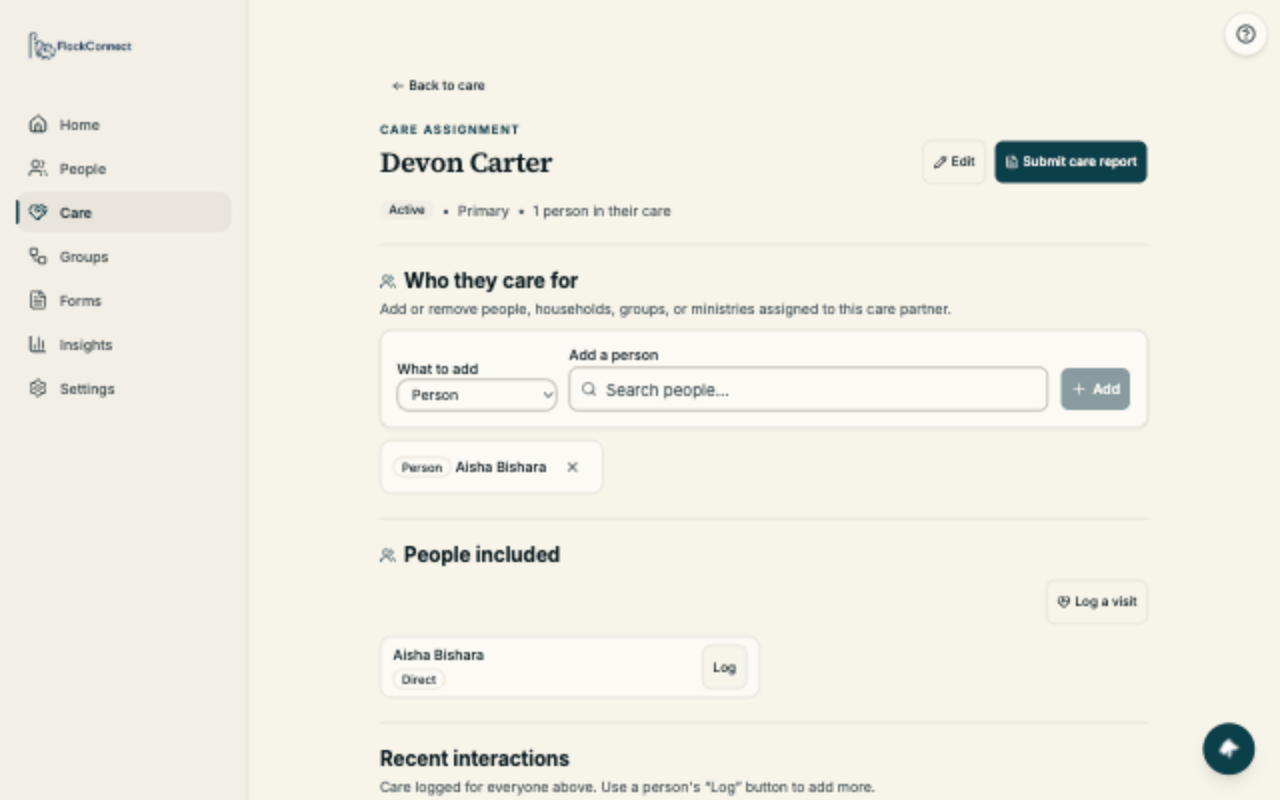
- Devon Carter's assignment displayed Active, Primary, and 1 person in their care, with Aisha listed.
- Reopened person profile
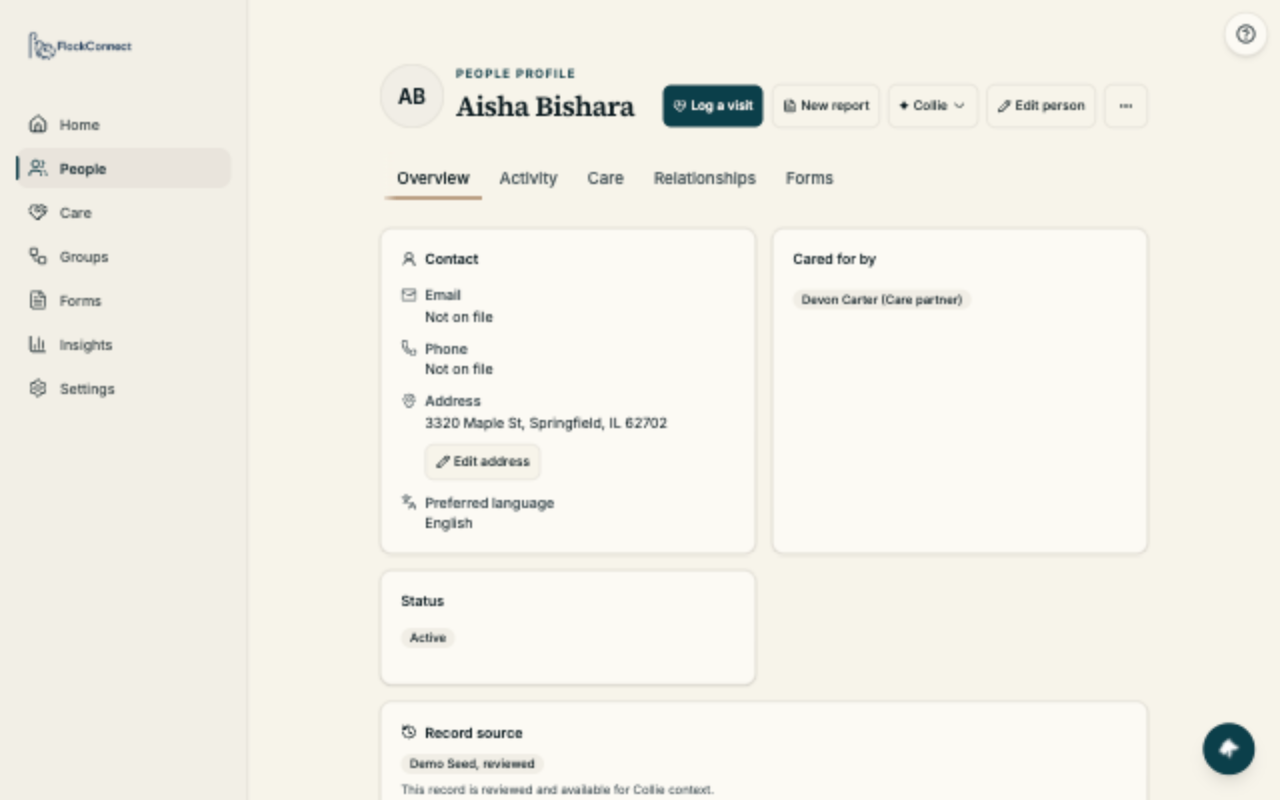
- Aisha's Cared for by section displayed Devon Carter (Care partner).
Screenshot walkthrough
This captioned clip is assembled from the observed demo states. It is a sequence of actual screenshots, with a full transcript below.
Download MP4 · Download captions
Read the complete video transcript
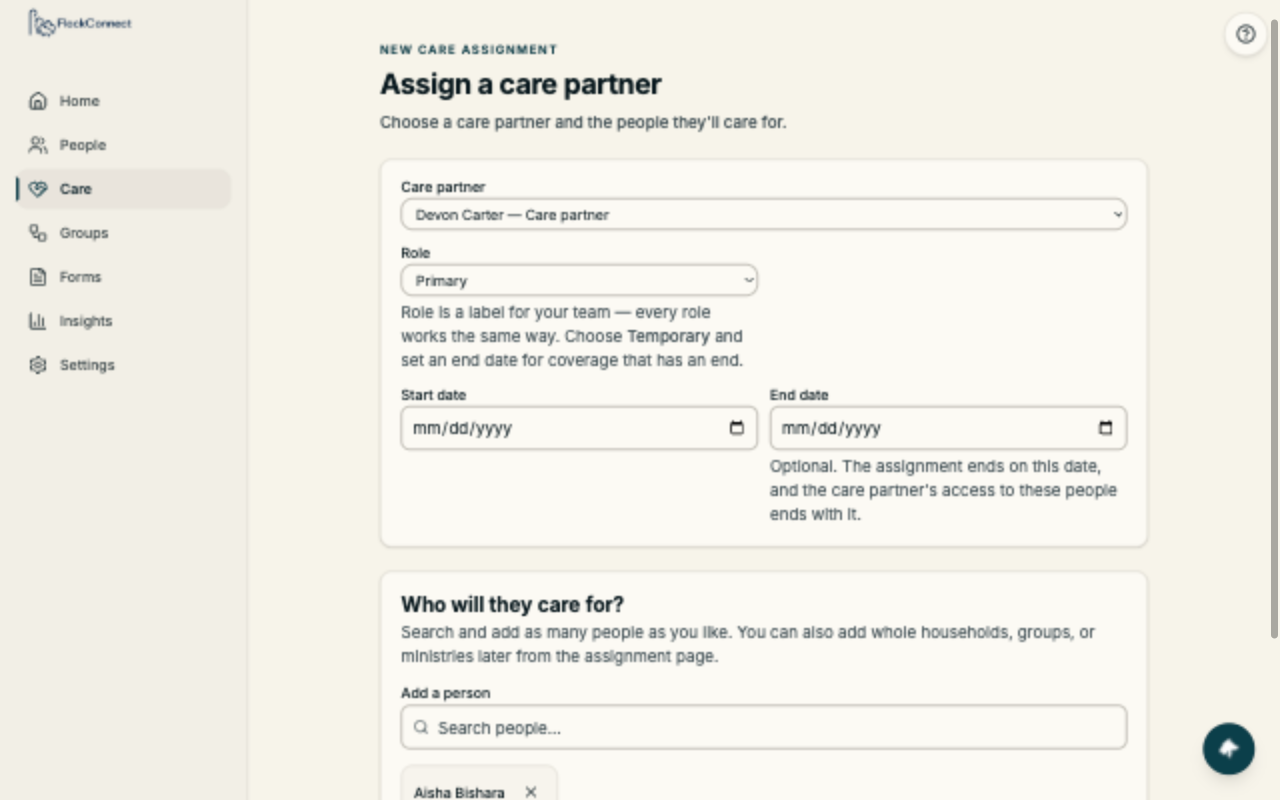
0s. In the fictional demo, select Devon Carter as care partner, Primary as the role, and Aisha Bishara as the person.
12s. Create the assignment. The saved view shows Active, Primary, and one person in their care.
24s. Reopen Aisha’s profile. Cared for by now names Devon Carter. Another account’s permissions were not tested.
1. Find the uncovered person
The tester opened Care, then Coverage, and found Aisha Bishara under Waiting to be assigned. That supplied a visible starting state before making the change. In a church trial, identify the person and intended worker first rather than assigning several households simply to make the coverage board look complete.
The useful preparation happens outside the form. Decide what the responsibility means, whether the worker is willing and available, and where a decline or absence should be reported. A software assignment can record a decision; it cannot establish that a conversation with the worker happened.
2. Choose the worker and the assignment
From Coverage, the tester opened Assign care partner. Devon Carter was selected as the care partner and Primary as the role. The start-date and end-date fields were left blank for this practice. This describes the submitted example; the session did not test scheduled starts, expiry, every role option, or their effects on access.
The tester used Add person to select Aisha Bishara. The person and worker were checked before Create assignment was selected. This is a good pause in a trial: ask the coordinator to say the intended relationship aloud. Matching the right worker to the wrong person would still create the wrong assignment.
3. Check the saved assignment
After Create assignment, the detail view named Devon Carter and displayed Active, Primary, and 1 person in their care. Aisha Bishara appeared under Who they care for and People included. Those details provided a result to compare with the choices made in the form.
The verification did not stop at the new detail view. The tester reopened Aisha Bishara's person profile. Its Cared for by section showed Devon Carter (Care partner). That second view established that the responsibility was visible on the person's record in the tested owner session.
4. Keep responsibility separate from a note audience
This exercise did not sign in as Devon or test which records a care-partner account received. It therefore supplies no independent permissions result. The vendor's care-assignment guide separately says that an assignment does not widen note visibility. Treat that as documented scope, alongside the UI observations above, rather than claiming that the owner view proved another role's access.
When preparing the church's own trial, use harmless records to examine each actual role. The worker may need a contact route and a practical brief without the private conversation behind the request. Agree the audience of a note separately from the person responsible for an action.
5. Give the assignment a working routine
Bring the saved responsibility into the next care-team review. Ask whether the worker understands the task, how new requests reach them, and who covers an absence. A name under Cared for by is useful when the coordinator can connect it to an accepted next action and a date to review unfinished work.
FlockConnect is a useful choice to evaluate when care responsibility is otherwise carried in memory or scattered across messages. In this demo, the owner could create a named assignment and find it again on the person's profile. Use that concrete observation to rehearse your own coordination routine, then record the role and access questions that still need a separate check.
Actual demo screenshots
Testing limits
- Observed in the account-owner role with fictional demo records. No care-partner sign-in or independent note-access test was performed.
- Start and end dates were left blank. Scheduled activation, expiry, access revocation, and every assignment role were not tested.
- The assignment is not evidence that a real worker accepted a visit, that a member was contacted, or that care outcomes improved.
Use the observation in your own trial
- Volunteer care brief: Agree the practical action and information the worker needs.
- Pastor-absence coverage card: Name cover for work that cannot wait until the usual worker returns.
- An accepted care handoff: Keep the responsibility transfer and the next accepted action together.
Related vendor documentation
The steps above describe the observed session. These documents provide the vendor’s wider instructions; their publication does not establish an additional test.